If you’ve ever spent hours setting up a desk for a home office, remote work, or even a small creative side hustle, you know how quickly clutter and power-related headaches can pile up. Between charging laptops, monitors, wireless headphones, power tools, and a dozen other gadgets, keeping everything powered safely and reliably isn’t just a convenience—it’s a non-negotiable. That’s where Desk Pro Sockets come in, and over the years, one question I hear more than any other is this: Does Desk Pro Socket have surge protection? As a supplier who’s been working directly with manufacturing teams, testing prototypes, and fielding customer feedback for nearly a decade, I’m here to break this down clearly, without the confusing jargon you’d find in generic product manuals. Desk Pro Socket
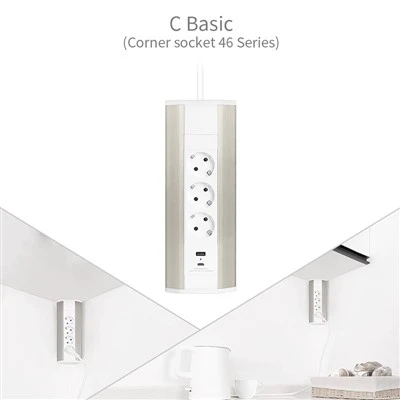
First, let’s get one thing straight: not all power sockets are created equal. If you’ve bought a cheap, unbranded power strip from a big-box store, chances are it’s just a series of extension cords plugged into a plastic case with no extra safety features. But Desk Pro Sockets were designed for people who use their desks for critical work—think graphic designers rendering 4K videos, small business owners running POS systems from their desk, or students relying on their laptops for final exams. Surge protection is a core feature of our standard line, but I know there’s still confusion about what that actually means, how it works, and whether it’s worth paying attention to. Let’s start with the basics: what is a power surge, and why should you care?
A power surge is a sudden spike in electrical current that can come from a few different places. The most common culprit is the local utility company—for example, when a neighboring home runs a high-powered appliance like a washing machine or air conditioner, it can create a small surge that travels through the power lines into your home. Then there’s lightning: even a strike a mile away can send surges through power lines, and if your desk setup is connected directly to the wall, that surge can travel straight into your expensive electronics. Finally, there are smaller, more frequent surges from within your own home: if you turn on a space heater, a microwave, or even a vacuum cleaner while your laptop is charging, that can create a minor surge that adds up over time, slowly damaging your device’s internal components.
Here’s the part most people don’t realize: even small, repeated surges are a problem. A single big surge can fry a device in seconds, but smaller, daily surges can shorten its lifespan by years. I’ve had customers reach out to me saying their 2-year-old laptop died suddenly, and when I asked if it was plugged into a power strip, it turned out they were using a cheap, unprotected one. They’d had it for 3 years, and those small surges had gradually worn down the battery and motherboard until it stopped working entirely. That’s the exact gap Desk Pro Surge-Protected Sockets are meant to fill.
Now, let’s get specific about our products. For years, every Desk Pro Socket we manufacture comes standard with UL-listed surge protection, built directly into the unit, not added as an afterthought. UL (Underwriters Laboratories) is the global independent safety certification body that tests electrical products for fire and shock risks, and their surge protection standards are the gold bar for the industry. Our standard Desk Pro Socket has a surge rating of 1000 Joules, which is the measurement of how much energy the unit can absorb before it can’t protect against surges anymore. For context, most basic power strips have a rating between 100 and 300 Joules—they’ll stop a single medium surge, but any subsequent surge will go straight through. Our 1000 Joule rating means it can handle hundreds of small daily surges, or at least one large surge, before needing to be replaced.
But surge protection isn’t just about the Joule rating. There’s also something called “clamping voltage,” which is the voltage at which the surge protection kicks in. A good clamping voltage means the unit will stop a surge before it reaches the safe threshold for your electronics. Our Desk Pro Sockets have a clamping voltage of 400 Volts, which is well below the 600 Volt threshold that most laptops, monitors, and other desktop electronics are built to withstand. That means any surge coming from the wall will be limited to 400 Volts or less before it reaches your devices, keeping them safe.
I know what some of you are thinking: “Wait, my Desk Pro Socket also has USB ports, do those have surge protection too?” The answer is yes. A lot of cheaper power strips add USB ports as a marketing gimmick, but they don’t add any surge protection for those ports. Plugging your phone or tablet into an unprotected USB port on a power strip is just as risky as plugging it into an unprotected wall outlet. Every Desk Pro Socket with integrated USB-A or USB-C ports has surge protection built into those circuits as well. That way, whether you’re charging your laptop, your wireless mouse, your phone, or your electric shaver, every connection is protected.
But here’s the honest, no-fluff part that you won’t find in our product specs: there are limits to surge protection. No power socket can protect you from a direct lightning strike—nothing can, except a professional whole-home surge protector installed by an electrician. But for 99% of everyday scenarios: surges from your home’s other appliances, minor utility spikes, and even that rare big surge from a local grid issue, our Desk Pro Sockets will protect your devices. That’s the tradeoff we’ve always been upfront about, and I’d never sell a product that makes false claims about what it can do. Over the years, we’ve had a few customers push back, asking why our sockets are a few dollars more than unprotected alternatives, but when they calculate the cost of replacing a $150 laptop, a $300 monitor, or even a $100 tablet, the extra cost of a Desk Pro Socket is a no-brainer.
Another common question I get: “How do I know if my Desk Pro Socket is actually providing surge protection?” There’s a simple test you can do, and it’s one we recommend to every customer who receives their order. Our surge-protected Desk Pro Sockets come with a small LED indicator light: a green light means surge protection is active, and if the light is red or not on, that means the unit’s surge protection has been used up and needs to be replaced. That indicator is non-negotiable on every unit we ship, because we don’t want our customers to be surprised when their surge protection stops working. We’ve heard too many horror stories of people buying a surge protector that stops working after a single surge, and they have no idea until their device breaks. The LED light removes that guesswork.
I also want to address a common misconception about power strips vs. surge protectors. A lot of people use the terms interchangeably, but they’re not the same. A basic power strip is just an extension cord with multiple outlets—no surge protection, no safety features, just a way to plug more things in. A surge protector is a power strip with built-in surge suppression. All Desk Pro Surge-Protected Sockets are surge protectors, not just power strips. That’s why we don’t sell unprotected power strips under the Desk Pro name; if we’re putting our brand on a product, it has to deliver on its promise of safety.
Over the past 10 years, I’ve worked with thousands of customers, from freelancers setting up a desk in their apartment to small offices with 10+ desk setups. One story that sticks with me is a freelance graphic designer in Portland who reached out after a storm knocked out power in her neighborhood. She had a Desk Pro Socket powering her main desktop and two external monitors, and when the power came back on, none of her devices were damaged. A friend of hers, who had used a cheap unprotected power strip, had to replace his $2,000 video editing desktop. She told me that single storm had made her a lifelong customer, and she recommended our sockets to every other freelancer in her coworking space. That’s the kind of impact we design for.
Now, for the practical side: if you’re looking to set up your own desk, how do you make the most of your Desk Pro Socket’s surge protection? First, don’t daisy-chain surge protectors. Plugging one Desk Pro Socket into another might seem like a way to get more outlets, but each time you add an extra surge protector, you reduce the total amount of surge energy the setup can absorb. Stick to one Desk Pro Socket per desk, and only plug in the devices you actually need that day. Second, keep your desk area well-ventilated. Even though surge protectors generate very little heat, overheating can damage the internal components that do the surge suppression, so don’t tuck your socket under a pile of books or next to a space heater. Third, replace your Desk Pro Socket every 3 to 5 years, or as soon as the LED light turns red. Surge protection components wear out over time, even if you never experience a big surge, so it’s better to be proactive than reactive.
I’ve been on both sides of this industry: I’ve bought cheap, unbranded sockets that died after a month, and I’ve worked to build a product that solves real problems for people who rely on their desks. At the end of the day, the answer to “Does Desk Pro Socket have surge protection?” is a resounding yes—but not just yes, it’s surge protection designed for daily use, tested to global safety standards, and backed by a team that cares about keeping your most important electronics safe.

If you’re looking to upgrade your home or office desk setup, or if you need bulk sockets for a small business or coworking space, I’m here to help. We offer a range of Desk Pro Sockets, from basic 4-outlet units to models with 8 outlets and integrated USB-C ports, all with full surge protection. Don’t settle for a cheap power strip that puts your devices at risk. Reach out to our team of product specialists to discuss your needs, get customized pricing, and learn more about how Desk Pro Sockets can keep your workspace safe.
PDU Sockets References
- Underwriters Laboratories. Standard for Safety for Surge Protective Components, UL 1449, 4th Edition. 2021.
- U.S. Department of Energy. “Electrical Safety in the Home: Surge Protection Guidelines.” 2022.
- Consumer Reports. “How to Choose a Surge Protector.” May 2023.
- International Electrotechnical Commission. Surge Protective Devices for Low-Voltage Installations, IEC 61643-11:2011. 2011.
Cixi Mingye Communication & Electronic Co., Ltd.
Cixi Mingye Communication & Electronic Co., Ltd. is one of the most professional desk pro socket manufacturers and suppliers in China, featured by quality products and good service. Please rest assured to wholesale durable desk pro socket at competitive price from our factory. Welcome to contact us for custom service and ODM service.
Address: West Industrial District,Guanhaiwei Town,Cixi city,Zhejiang Province,China
E-mail: enquiry@officelink.com.cn
WebSite: https://www.officelinkelectric.com/
