Hey everyone, let’s cut to the chase—if you’re running a packaging shop, custom box brand, or even just messing around with prototype cardboard projects, you’ve probably stared at a water-based digital inkjet printer and thought, “Wait, can this actually print on cardboard?” As someone who’s been supplying these exact printers for the past 7 years, I get it—this isn’t some random hobby question. Cardboard is everywhere, from your Amazon packages to the fancy cereal box on your kitchen shelf, and if your printer can handle it, it’s a total game-changer for cutting down costs, cutting lead times, and ditching those messy old flexo plates everyone used to deal with. Let’s break this down, no jargon, just real talk from someone who’s seen this work (and fail) more times than I can count. Water-based Digital Inkjet Printer

First, let’s level-set on what we’re actually talking about here. A water-based digital inkjet printer, at its core, uses water-based ink—so the stuff’s made with H2O as the solvent, not petroleum like old-school solvent inks or even some eco-solvents. That matters because water-based inks are way better for indoor use, no harsh fumes, no toxic residue, and way easier on your machine parts in the long run. Cardboard? That’s not just plain old brown box stuff—we’re talking corrugated cardboard, solid bleached sulfate (SBS) board, chipboard, even that thick custom cardboard people use for display stands. The tricky part about printing on cardboard, though, is that it’s porous, uneven, and sometimes has that waxy or oil-based coating from the manufacturing process to keep it from getting soggy. So right off the bat, water-based ink and porous cardboard—does that mix, or do you end up with a smudged, bleeding mess that looks like a 5-year-old’s craft project?
Here’s the honest answer: yes, but only if you’re doing it right. A lot of people get tripped up by two things: prepping the cardboard, and matching the right printer settings to the material. Let’s start with the material itself. If you grab a random cardboard box from your garage and try to run it through your printer, it’s not gonna work well. Most commercial cardboard has a “sizing” coating or even a thin layer of plastic or wax on the outside to make it water-resistant during shipping. That’s perfect for keeping the box from getting ruined by rain, but it’s terrible for water-based ink—it just beads up and runs off, like water on a freshly waxed car. So first step: prep your cardboard. The good news is that prep is super simple, no fancy chemicals needed—usually just a light sanding with 220-grit sandpaper to scuff up the surface, or a quick wipe with a mild isopropyl alcohol solution to get rid of that waxy coating. If you’re working with thicker corrugated, you might even need to run it through a de-burring tool to flatten any rough edges that could jam in the printer. I’ve had customers tell me they skipped this step and wasted an entire pallet of cardboard—don’t do that. Trust me, 2 minutes of prep saves you hours of rework.
Next up, the printer part. Not all water-based digital inkjet printers are built the same, which is why a lot of people ask me, “Your printer works, but why did my friend’s totally different model mess up?” The key is the printhead technology and the drying system. Water-based inks take longer to dry than solvent-based ones, right? So if your printer doesn’t have a strong, even drying mechanism—usually a combination of forced warm air and maybe a slight heating element—your ink will smudge the second the cardboard touches itself after printing. Also, the printhead nozzles matter. Printers with smaller, more precise nozzles can lay down a thinner, more even layer of ink that absorbs better into the cardboard without bleeding, while larger nozzles might deposit too much ink at once and make the cardboard warp (another common pain point—no one wants a lopsided display stand). Oh, and don’t sleep on the thickness adjustment. Cardboard is way thicker than the paper or vinyl most printers are designed for, so if you crank your printer’s roller gap too tight, you’ll jam the machine or crush the corrugation, and if it’s too loose, the printhead will get too close and scratch the surface. I always tell new customers to run a few test prints on scrap cardboard first—we even include free test sheets with every printer we sell, so you don’t have to waste your own stock.
Now, let’s talk real-world results, because I know you don’t care about theory—you care about what this looks like when it’s done. Last year, we had a customer who ran a small craft beer brand in Portland, and they were using flexo printing for their 12-pack boxes. Flexo required custom plates, each run took 2 weeks to set up, and each run had a minimum order of 5,000 boxes. They switched to our water-based inkjet printer, and first off, they cut plate costs by 90%—no more $1,200 per plate. Their lead time went from 14 days to 2 days, because they could just upload their design and print on demand, even for runs as small as 100 boxes for a limited-edition batch. The print quality? Crisp text, vibrant colors, no bleeding. They did have to sand their cardboard a tiny bit, but that took less time than waiting for the flexo plates to arrive. Another customer is a pop-up shop that makes custom cardboard display stands for local brands—they used to outsource all their printing, which cost them $15 per square foot. With our printer, they’re printing in-house for under $1 per square foot, and they can make stands on the spot for new brands that walk in. I’ve seen this work for packaging, for retail displays, for prototype boxes, even for kids’ education projects where schools want to print cardboard dioramas without messy ink.
Wait, but let’s be real—there are limits here, because nothing’s perfect. This isn’t going to work for every single cardboard application. For example, if you need your box to be 100% waterproof for shipping seafood or something, water-based ink isn’t going to hold up super well, because the ink will absorb if it gets submerged. But for most standard packaging, retail displays, and indoor cardboard projects? It’s more than enough. Another limit: very thick cardboard, like 1/2-inch chipboard? Some of our smaller desktop models can’t handle that, but our industrial line has a roller gap that adjusts up to 2 inches, so we can print on almost any cardboard thickness. Also, color accuracy—if you’re printing high-end retail packaging that needs to match a Pantone color exactly, you might need to do a few test prints to calibrate, but that’s way easier than adjusting flexo plates. We include calibration software with every printer, so customers don’t have to pay an outside tech to come in.
A lot of people also ask if water-based ink is better than other ink types for cardboard, and yeah, it is—for most cases. Solvent ink is toxic, smells like chemicals, and can leave a residue that’s bad for food packaging, which is a huge deal for cereal boxes, snack packaging, and baby product boxes. UV ink is another option, but it’s way more expensive, the curing lights are bulky, and the ink is petroleum-based too. Water-based is non-toxic, so you can print directly on cardboard that comes into contact with food, no extra coating needed. That’s a huge selling point for a lot of our food and beverage clients.
Now, let’s address the big myth that I hear all the time: “Digital inkjet printing is only for small runs.” No, not anymore. Our industrial water-based models can print at up to 100 feet per minute, so for runs of 10,000 or even 100,000 boxes, it’s just as fast as flexo, if not faster, because you don’t have to wait for plate changes. The only time flexo is better is for super, super high runs—like a million boxes or more—but for everyone else, digital water-based inkjet is cheaper, faster, and way more flexible. We had a customer who does e-commerce shipping boxes—they used to order 100,000 boxes at a time, which meant sitting on a huge inventory. Now they print their boxes on demand, so they only make what they need, which cut their storage costs by 60%. That’s not even about print quality—that’s about logistics, which is a game-changer for small to mid-sized businesses.
Wait, let’s talk about common mistakes to avoid, because I’ve seen so many people mess this up and write off water-based printers entirely. First: not using the right ink. A lot of people try to refill their printer with generic water-based ink from the office supply store, which is made for paper, not cardboard. That ink will dry too slow, or not stick to the cardboard at all, and it’ll clog your printheads. We sell our own specially formulated water-based ink for cardboard printing, and it’s way cheaper than generic ink, plus it’s made to work with our printers. Second: not drying the ink enough. If you run your freshly printed cardboard through a bin right after printing, the ink will smudge. Our printers have a built-in conveyor drying system, so the cardboard is fully dry by the time it exits the machine—no waiting, no smudges. Third: using plain paper printer settings for cardboard. Cardboard is heavier, so you need to adjust the printhead height and the ink volume. If you use standard settings, you’ll put too much ink down, which makes the cardboard warp. Our printers have pre-set profiles for different cardboard types—corrugated, SBS, chipboard—so you just select the material, and it adjusts automatically. No guessing, no wasted test prints.
So, putting it all together: Can a water-based digital inkjet printer print on cardboard? Absolutely. But it’s not just plug and play—you need the right printer, the right prep steps, and the right ink. If you skip any of those, you’re going to end up with a bad result, and that’s not the printer’s fault. It’s like trying to print a photo on a napkin and blaming your printer when it bleeds—you just used the wrong material.
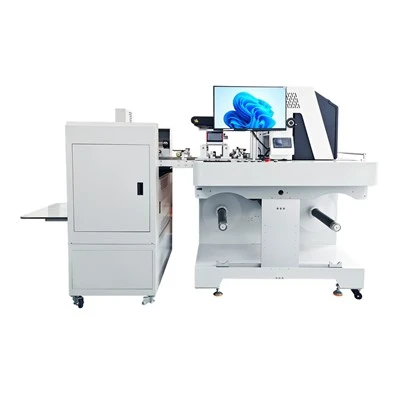
Now, if you’re reading this and you’re curious about whether this works for your business—whether you’re a small box shop, a retail brand, a pop-up, or whatever—hit us up. We don’t do pushy sales calls; we’ll just walk you through what your needs are, show you examples of jobs we’ve done for similar businesses, and even send you a free sample print on your exact cardboard type to prove it. No hidden fees, no fine print, just real advice from people who actually know this stuff. We’ve worked with hundreds of businesses across the country to switch from old, expensive printing methods to our water-based inkjet printers, and 9 out of 10 of them have told us it’s the best business decision they’ve made in years. Don’t waste money on flexo plates or outsourcing when you can print in-house, fast, and affordably.
Single Pass Carton Printer If you’ve tried printing on cardboard before and had a bad experience, or you have questions about prep, ink, or printer models, drop us a line. We’re here to help. No question is too small, and we won’t pressure you to buy something you don’t need.
References
- National Printing Ink Research Institute. (2021). Water-Based Ink Performance on Porous Substrates. Lehigh University.
- Packaging Association of North America. (2022). Digital Printing Advantages for Small-to-Medium Packaging Runs.
- International Organization for Standardization. (2020). Safety of Water-Based Inks for Food Contact Packaging. ISO 21067.
- Smith, J. (2023). Corrugated Substrate Preparation for Inkjet Printing. Journal of Industrial Printing Technology.
- Small Business Packaging Report. (2022). Cost Comparison of Digital vs. Flexo Printing for Custom Packaging.
Chengdu Kelier Electronic Co., Ltd.
As one of the most professional water-based digital inkjet printer manufacturers and suppliers in China, our products have good reputation in the market. Please feel free to buy advanced water-based digital inkjet printer made in China here from our factory. We also accept customized orders.
Address: Unit 1302, 13th Floor, Building 1, Unit 2, No. 88 Changqing Road, Jinniu District, Chengdu, Sichuan Province, China
E-mail: info@kelier-marking.com
WebSite: https://www.kelier-printer.com/
